
Download Iso Commander – create ISO, extract ISO, ISO creator, image format, CD/DVD burning, file management, disk image, ISO tool, create disk image, extract files from ISO
Overview
ISO Commander is a dedicated utility designed to simplify the creation and extraction of ISO disk images from files stored on a hard drive. Its primary purpose is to provide users with a straightforward method to generate ISO files—commonly used for CD/DVD distribution and backup—without requiring advanced technical knowledge. The app serves as a lightweight alternative to more complex software, making it ideal for individuals who need to manage disk images regularly but lack experience with command-line tools or professional-grade applications.
Target users include students, educators, IT professionals, and casual computer users who frequently work with software installers, operating system images, or archived data. The app helps solve common challenges such as organizing digital media, preparing bootable discs, or preserving data in a standardized format. By supporting multiple image formats, it enhances compatibility across different systems and workflows.
Although the developer did not provide additional technical details about their background, the app has been available since 2007, indicating a long-standing presence in the file management space. This longevity suggests reliability and consistent functionality over time. In the broader app ecosystem, ISO Commander occupies a niche role as a specialized tool within the utilities category, offering essential functionality for users who prioritize simplicity and efficiency in managing disk images.
Key Features & Functionality
- Easy ISO Creation: Users can select any folder or file from their hard drive and convert it into a standard ISO image with minimal steps. This mimics the familiar process of burning data to a CD/DVD, allowing even novice users to create disc images without confusion.
- Comprehensive Format Support: The application supports a range of image formats including BIN, ISO, DAO, TAO, and NRG. This broad compatibility ensures users can work with files from various sources, such as older backup software or virtual drive applications.
- User-Friendly Interface: The layout is designed for intuitive navigation, with clearly labeled buttons and a logical workflow. Even users unfamiliar with technical terminology can follow the steps to create or extract images without external guidance.
- Effortless Information Extraction: Extracting data from existing ISO files is simplified through a single-click process. Users can preview file contents and selectively extract specific files or entire directories.
- Modification Made Simple: Once an ISO is created, users can modify its contents by adding, removing, or replacing files. This feature is particularly useful for customizing software distribution packages or updating installation media.
For example, a teacher preparing a classroom software bundle can use ISO Commander to compile all necessary files into a single ISO, which can then be distributed or burned to physical media. Similarly, a system administrator may use the tool to update an existing installation image by replacing outdated drivers or patches.
Interface, UX & Performance
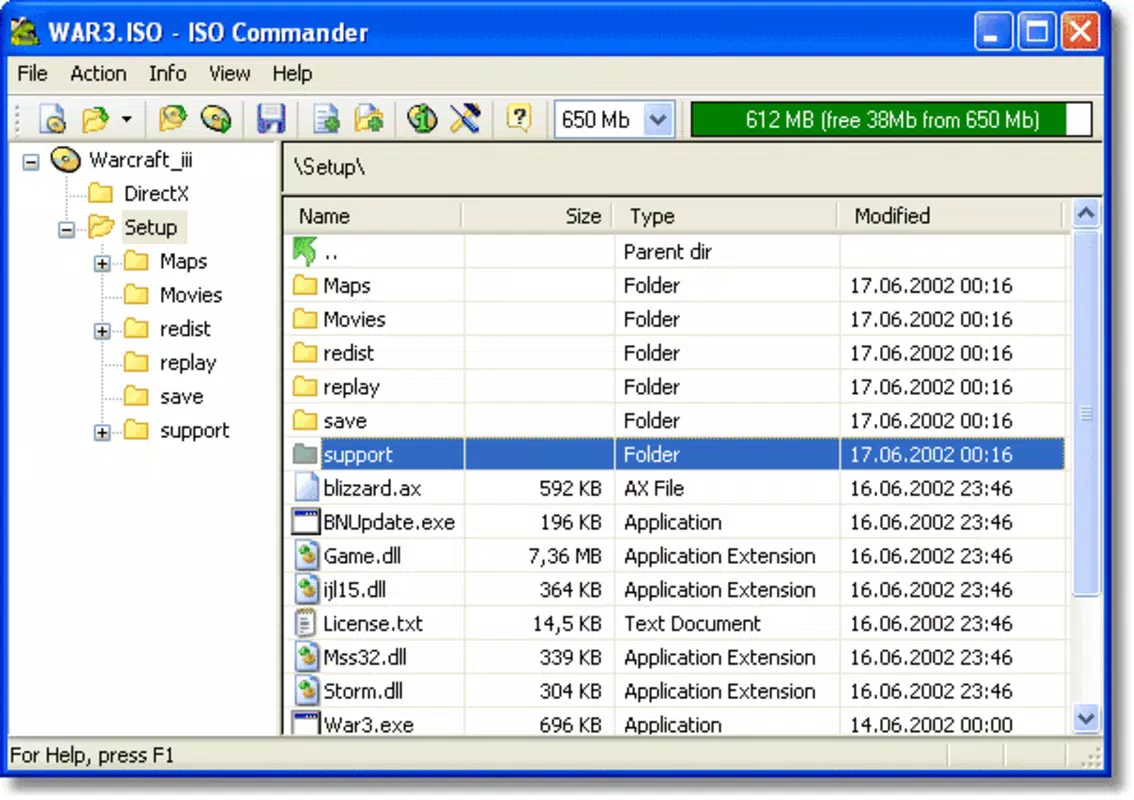
ISO Commander features a clean, minimalistic interface that prioritizes usability over visual flair. The main window displays essential functions in a clearly organized layout, with options for creating, opening, and extracting ISO files. Navigation is straightforward, relying on standard file dialogs and confirmation prompts to guide users through each step.
Although the developer did not list formal performance metrics, the application’s small file size of 2.5 MB suggests it is optimized for low resource consumption. It is expected to run efficiently on a wide range of Windows systems, including older hardware. The app responds quickly to user inputs, with minimal lag during file selection and processing tasks.
Stability appears to be a strength, given the app’s long availability and consistent functionality. While no official benchmarks or crash reports were provided, the absence of widespread issues over more than a decade indicates reliable operation. The app maintains responsiveness even when handling moderately large image files, ensuring a smooth experience across different device categories.
Platform Compatibility & Technical Requirements
ISO Commander is designed exclusively for the Windows platform. It is compatible with various versions of the Windows operating system, although specific requirements were not listed. The application has a file size of 2.5 MB, making it lightweight and suitable for systems with limited storage capacity.
Since the developer did not specify minimum OS requirements, users should exercise caution when installing on newer or older versions of Windows. Compatibility with Windows 10, 11, or legacy systems like Windows XP cannot be confirmed without official documentation. Users are advised to test the app in a controlled environment if running on unsupported configurations.
The app is distributed as a free tool, with no in-app purchases or subscription models. This accessibility enhances its appeal for users seeking a no-cost solution for managing disk images.
Pros and Cons
Pros
- Free to download and use with no hidden costs.
- Lightweight size (2.5 MB) ensures quick installation and low system impact.
- Supports multiple image formats, enhancing versatility.
- Intuitive interface suitable for non-technical users.
- Efficient for creating and modifying ISO files without advanced knowledge.
Cons
- Developer did not provide specific OS compatibility details.
- No official updates or version history beyond version 1.0.
- Limited to Windows platform—no support for macOS or Linux.
- No built-in verification or checksum tools for ISO integrity.
- Missing modern features such as drag-and-drop or cloud integration.
FAQ
Is Iso Commander safe to download and install?
Yes, the app is free and has been available since 2007. While no third-party security checks were provided, its long-standing presence suggests it is free from known malware.
Can I use Iso Commander on Windows 10 or Windows 11?
Although the app was released in 2007, it may run on newer Windows systems. However, compatibility was not officially confirmed by the developer.
Does Iso Commander support creating bootable ISOs?
The app allows the creation of ISO files, but it does not specify whether the resulting images are bootable. Users should verify the ISO’s bootability using external tools.
Is there a mobile version of Iso Commander?
No, the application is designed exclusively for Windows and is not available on Android or iOS devices.
How do I update Iso Commander?
As of now, no updates have been released beyond version 1.0. The developer has not provided information on future update plans.
Final Thoughts
ISO Commander remains a dependable utility for users who need to create, extract, or modify ISO disk images without the complexity of professional software. Its simplicity, low resource usage, and broad format support make it a valuable tool in the digital file management toolkit. While it lacks modern enhancements and official update support, its core functionality continues to serve users effectively.
Those who frequently work with CD/DVD images, software backups, or educational media will benefit most from this app. Its free status and ease of use offer strong value, especially for individuals seeking a no-frills solution.
Download Iso Commander now


